
Any article, summarized in one tap.

Any long article, summarized before you scroll.

SumSpot reads the page as it loads and leaves the short version waiting for you — news, blogs, documentation, research write-ups. Anything long enough to want the gist first. In Safari, on iPhone, iPad and Mac.
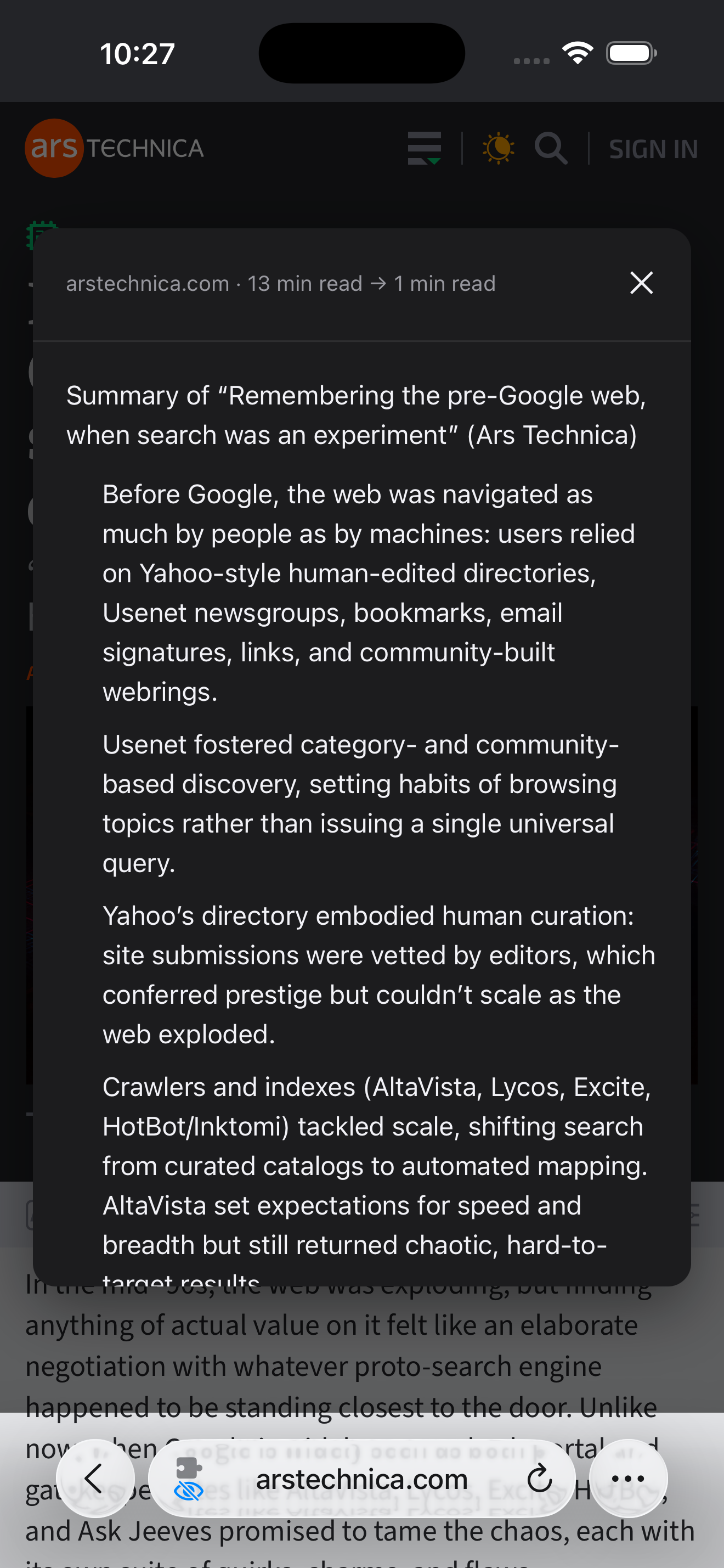
Read the short version first

You've opened something that looked worth reading, and it turns out to be three thousand words.

SumSpot has already summarized it. The core of the piece is waiting in the page, in whatever shape suits it — a short paragraph, a handful of key points, or both — and you don't have to ask for it or go anywhere else to read it.

Still interested? The whole article is right there underneath.

Download the Safari Extension

SumSpot's summary panel open over a long article in Safari on iPhone. Its header reads "arstechnica.com · 13 min read → 1 min read", above a summary of the article in short bullet points.

Save time

You got hooked by the headline, but what you actually want is the payoff.

SumSpot puts a short summary right in the page, so you can get the point in seconds and decide whether the other twenty minutes are worth it.

Download the Safari Extension

Wherever you read

News sites, blogs, long-form reporting, release notes, documentation, research write-ups. SumSpot works across the web rather than inside one publisher's app, so it's the same experience wherever you land.

And the summary appears in the browser, on the page you're already on — there's no daily digest email to fall behind on, and nothing to save for later.

Download the Safari Extension

Keep up

When the long pieces take seconds instead of twenty minutes, you get through more of them — and you can hold your own in the conversations about them, at work and with friends and family.

Download the Safari Extension

Always ready, never in the way

There's no button to hunt for and no app to switch to. Open an article and the summary is already there, waiting in the page.

It stays out of your way until you want it — glance at the gist, then keep reading, or move on. And because it lives in Safari, it's the same one-glance habit on iPhone, iPad and Mac.

You choose where it runs: allow SumSpot on one site, on every site, or nowhere, and change your mind whenever you like.

Download the Safari Extension

What it costs

SumSpot is free to download, and your first few summaries are free, so you can see it work on the sites you actually read. After that, unlimited summaries take a subscription:

  • $24.99 a year
  • $3.99 a month, starting with a one-week free trial for new subscribers
  • $1.99 a week

Every plan gives the same thing, on iPhone, iPad and Mac. Prices are in US dollars; elsewhere the App Store shows your local price. Subscriptions are billed and managed by Apple, and you can cancel any time in your Apple Account's subscription settings.

Download the Safari Extension

Questions

What do I need?

Safari on an iPhone or iPad running iOS 15 or later, or on a Mac. After installing, you turn the extension on in Safari's settings; the app walks you through it.

What happens to the pages I read?

To summarize a page, SumSpot sends its address and visible text to our server, and the text on to OpenAI, which writes the summary. It only runs on sites you have allowed, so turn it off for any site you'd rather keep to yourself. There's no account to create, and no ads. The privacy policy sets out exactly what is sent, kept and for how long.

Do I have to tap anything?

No. On a site you've allowed, SumSpot summarizes the page as it loads. A page you've already summarized shows the saved copy instantly.

Who makes SumSpot?

SumSpot LLC. Questions and feedback go straight to the people who build it at [email protected].